‘Landline’ is a free app for audio archiving site-specific experiences. It was built with JavaScript, HTML5 and CSS using the ApplicationCraft cloud IDE and compiler. It runs on Android, iPhone and from the Chrome web browser, links at the bottom.
A city’s character permeates through the membranes of its communities, structures and systems. So what and where does Ottawa fall in the spectrum of the global community and does the city’s cosmopolitan nature define its identity?
‘Landline’ is a city-based project that promotes the democratisation of the local voice within the context of the built environment it is affected by. This living archive gains agency through participation and has the potential to become a geo-located audio map of places within the city recounted democratically, and anonymously if the participants wish.
Use it to record up to 3 minutes of audio about a space that affects you emotionally or physically. Use is to share an anecdote that needs to be heard. Then listen to what other people think of the spaces they inhabit every day. This is a creative city intervention that discusses the regions culture and current social stance.
Created by artists: Megan Smith, Michael Grant & Jean-Marc Le Blanc Commissioned by: Artengine – ‘We Make the City! We are the City!’ Festival, Ottawa, ON, 2013. With funding from the Canada Council for the Arts.
A few years back I made a motion sensitive night light as a Mother’s day gift and while it worked pretty well it really chewed out the batteries. And as with all devices that eat batteries it eventually fell out of use. The standby current was around 4 mA due to the common LM324 opamp that was used to amplify the PIR motion sensor signal. The original enclosure was CNC milled from a bit of re-purposed apple which had a former life as a guitar body I built as a child. Apple happens to be my favorite wood, it’s rich and creamy and the project just needed some new electronic guts:
The new variant sports a TLC1079 micropower quad opamp from TI that draws just 150 microwatts per channel. It also received an upgrade from a Tiny13 to a Mega328p allowing for a custom Arduino bootloader spec’d for operation at 1MHz. The upload speed was set at 62500 baud as this worked out best with the internal 8Mhz RC oscillator divided by 8. As can be seen in the schematic below, the entire circuit forgoes a regulator and runs directly from battery. It also includes a CDS to sense the light, a pair of RGB LEDs switched with 3 P-channel FETs and a 6 pin port to connect a USB to serial converter. Note the DC blocking 4.7uF capacitor, non-polarized ceramic or polypropylene works best, all other parts are standard fare. Click to view a larger image:
After the circuit was prototyped on a breadboard Arduino, it was moved to a piece of predrilled strip board for quick assembly. Not shown are the P-channel FETS which are on the original RGB LED board under copious amounts of hot glue for diffusional purposes. The LED PCB was originally made with the toner transfer method but strip board would have sufficed just as well. The Red PCB holding the PIR sensor had a previous life as a TriggerTrap motion sensor, there are a few components under the dome as well. Here is the circuit board with a bit of heatshrink keeping all the arms and legs inside:It’s been bench tested from 5 volts down to 2.7 volts and at a nominal battery voltage of 4.5 volts, it draws just 0.08 mA in sleep mode. This equates to over 3 years of standby from a triple set of AA batteries. Motion detection is quite good at over 5 meters and it’s more than what’s required to keep Mom from tripping up if she gets up for a night time stroll.
Programming was done in the Arduino IDE and the n0m1 sleep library was used to shut down the microcontroller for power saving. The device wakes from slumber when either of the external interrupts are triggered, the light sensor triggers interrupt 1 and the motion sensor triggers interrupt 0. The code itself is very simple, the light sensor sets the mode and if the mode is nighttime, the motion sensor triggers the RGB LEDs to cycle through a color gradient using the Hue to RGB conversion code. As can be seen in the following video, it takes about 10 triggers to get all the way through the gradient as each trigger shows just one primary color and a bit of secondary color:
We’ve implemented an optical infrared Arduino bootloader based on the common 38kHz infrared remote modualtion. Using the Asuro as inspiration, our bootloader goes a step further in that it works seamlessly from within the Arduino IDE, utilizing the STK500V2 protocol without modification.
As described in detail below, due to hardware specifics and a low carrier frequency, the maximum data rate is 4200 baud and in practice about 4k baud reliably without error. While not amazingly fast, this results in about 1 min 30 seconds to transfer a moderately large Arduino sketch of 20kb. With the sketch loaded, the IR hardware also functions as a bidirectional half duplex serial link. As itemized in the following list, the project as a whole is the sum of it’s parts:
Echo Cancellation Simplex
Continuous Demodulation
Demodulator Phase Delay
USB Transceiver (Software)
USB Transceiver (Hardware)
Arduino IR Transceiver
Arduino Bootloader
Board Specifications
Echo Cancellation Simplex If you’ve ever talked to someone on speakerphone and heard your own echo, you can understand the confusion this creates. This is the issue when adapting the normally full-duplex USB converter to infrared communication, while transmitting the reflected infrared bitstream is also being heard and it stuffs up the receive buffer like a bad head cold. To make the bootloader work seamlessly with the Arduino IDE over modulated infrared, full duplex serial operation is blocked, this is achieved on both sides with software and/or hardware.
Continuous Demodulation Almost all infrared receivers found in home appliances have an automatic gain control (AGC) circuit to account for variations in signal strength as well as ambient interference from fluorescent lights. If your lucky, the datasheet for the part will state the maximum duty cycle for data transmission before the AGC normalizes the signal and kills the output. From testing it appeared to be less than 5%, which is much too low to send appreciable amounts of data within a reasonable time frame.
Ideally we want the AGC to allow a bit over 50% or no AGC at all. Infrared demodulators without AGC are not common but thankfully, they do exist. Besides being specifically purposed for high volume data transmission, they also find use in sensing and light barrier systems. A couple of these devices are the TSOP58038 and the TSOP4038 from Vishay.
Demodulator Phase Delay To reject ambient noise, the infrared data is modulated with a 38kHz carrier frequency, a digital one is represented as a tone and a digital zero as no tone. When the demodulator sees the correct carrier frequency, it outputs a digital one. Inside the demodulator, the detection process is implemented in analog as a band pass filter and requires about 7 carrier waves to pass before it reports on the output. It is this requirement that introduces as phase response delay of about 200 microseconds and which can be seen in the following signal capture of the transmission “Hello World”:
The red signal is the 38kHz modulated send and yellow is the demodulated receive signal. The received signal is phase shifted right a full bit width (200us), resolution is at 1ms per division.
USB Transceiver (Software) For simplicity the computer side transceiver was first implemented in software with a spare Arduino and an IR shield. A 120 ohm resistor is used to hold the Arduino’s reset pin high, preventing the transceiver from resetting. It’s implemented using pinChange interrupt as a bit bang pass though, with the condition that when transmitting, the receiver is ignored. As TTL serial signals are active low and the IR LED is active high, the transmission component is inverted.The Arduino, the IR shield and the logical truth table to make sense of it all.
USB Transceiver (Hardware) Once the transceiver was proven in software, the design was moved into the hardware space. This presented a couple of challenges in that the aforementioned phase delay made a logical OR difficult. The solution was to implement a similar or longer delay on the TX line OR input. As can be seen in the following schematic, this is implemented with a 100nF capacitor and 4k7 resistor, click for pops:
The phase delay arrangement turns on quickly and turns off slowly, adding about 2 milliseconds to block the receiver while transmitting using a bit of transistor logic. As the signals are active low and the TX line is inverted, the gate function required for RXD is the logical OR between inverted TX and the demodulator output (refer to truth table for clarification).
Arduino IR Transceiver On the Arduino side, all that is required for additional hardware is a demodulator and an IR LED, this makes for a very cheap Arduino sans FT232R converter. The demodulator is connected directly to the Arduino UART receiver (Pin 0). The IR LED connection takes inspiration from the Asuro bootloader, the LEDs anode is fed with a 38kHz PWM from Pin3 while the cathode is connected to Arduino Pin1, the UART Transmitter. As TTL serial is active low, the LED lights with the 38kHz carrier when commanded by the UART.This schematic has been setup on a bread board Arduino, the basics which have been detailed in the previous post here: http://krazatchu.ca/wp/2012/04/30/how-to-bread-board-arduino/
Arduino Bootloader The existing bootloader was modified for half duplex by turning off the receiver while transmitting, 38kHz PWM was setup and some delay was added to handle the phase offset of the demodulator. Prior to making changes, some effort was required to successfully compile the bootloader as documented here: http://krazatchu.ca/wp/2012/04/01/how-to-compiling-the-arduino-bootloader/
When uploading the IDE checks for the existence of the bootloader, so the hex, source and makefile need to be in the folder here: arduino-1.0hardwarearduinobootloadersIRbbArduino. The source, hex and makefile can be downloaded here: IRbbArduino.
Board Specifications The final bit of the puzzle is to let the Arduino IDE know who we are talking to. We add a few lines of text to the end of the boards.txt file in arduino-1.0hardwarearduino. As seen below, it defines who, what and how we are talking. The IDE must be restarted for these changes to apply:
Video Of course no post would be complete without a video of the bootloader in action. The autoreset feature has yet to be implemented but will include a line in the sketch to signal a reset vector on command. For now it’s reset manually or with power on, there is about a 2 second window in which it must be reset after the IDE indicates uploading.
As per requested in comments below, here is the code for the PC side software transceiver which runs on an Arduino. Don’t forget to disable reset with a 120 ohm pullup, otherwise the Arduino will bootload instead of passing the data along to IR.
/*
 n0m1 IR bootloader PC side, software based bitbang pass through
 http://krazatchu.ca/wp/2012/05/07/superduplex-an-infrared-bootloader-for-arduino/
 by krazatchu & socialhardware - 2012/05/07

 IR Demodulator on pin 2
 IR LED on pin 3 with NPN inversion

 PC TXD on pin 1
 PC RXD on pin 0

 Reset pullup/disable using 120 ohm resistor
 Optional Red LED indictor on A1/A4
*/

#include <PinChangeInt.h>
boolean SerialRX = false;

void setup() {
  // dont use serial - bitbang output by turning pwm off and on

  // onboard Red LED indicator
  pinMode(A1, OUTPUT); // LED Anode
  pinMode(A4, OUTPUT); // LED Cathode

  // Disable the Timer2 Interrupt (which is used for receiving IR)
  TIMSK2 &= ~_BV(TOIE2); //Timer2 Overflow Interrupt

  pinMode(3, OUTPUT); // IR TXT PWM
  digitalWrite(3, LOW); // IR TXT PWM

  // COM2A = 00: disconnect OC2A
  // COM2B = 00: disconnect OC2B; to send signal set to 10: OC2B non-inverted
  // WGM2 = 101: phase-correct PWM with OCRA as top
  // CS2 = 000: no prescaling
  TCCR2A = _BV(WGM20);
  TCCR2B = _BV(WGM22) | _BV(CS20);

  // The top value for the timer.  Mod frequency will be SYSCLOCK/2/OCR2A.
  OCR2A = 210; // SYSCLOCK / 2 / khz / 1000; = 16M /2 /38 /1000 = 210.526
  OCR2B = OCR2A / 3; // 33% duty cycle

  pinMode(0, INPUT); // Serial receiver
  PCintPort::attachInterrupt(0, serialRXDoff, RISING);
  PCintPort::attachInterrupt(0, serialRXDon, FALLING);

  pinMode(1, OUTPUT); // serial out
  digitalWrite(1, HIGH); //
  pinMode(2, INPUT); // IR RXR1 38kHz
  PCintPort::attachInterrupt(2, serialTXDoff, FALLING);
  PCintPort::attachInterrupt(2, serialTXDon, RISING);

}

void loop() {
 // do nothing, let interupts work
}

void serialRXDon (){
	// turn pwm on - PIN3
	SerialRX = true;
	// or switch to in/out
	TCCR2A |= _BV(COM2B1);
	// blink (300);
}

void serialRXDoff (){
    // turn pwm off - PIN3
    TCCR2A &= ~(_BV(COM2B1));
    // digitalWrite(3, LOW);
    PORTD &= ~(1<<PORTD3);
    SerialRX = false;
}

void serialTXDon (){
    // turn on FTDI RXD
    if(SerialRX == false){
        // led on
		PORTC &= ~(1<<PORTC1);
        PORTD |= (1<<PORTD1);
	}
}

void serialTXDoff (){
	// turn off FTDI RXD
	if(SerialRX == false){
		// led off
		PORTC |= (1<<PORTC1);
		PORTD &= ~(1<<PORTD1);
	}
}
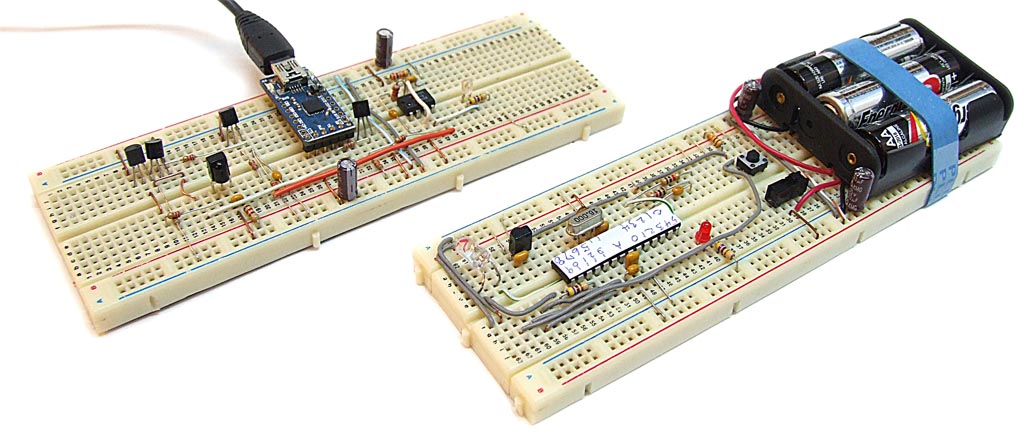
Having a couple of Bread Board Arduinos handy can really make prototyping quick and painless. And while the Bread Board Arduino has pretty much been flogged to death in every way, shape and horse, we’re posting our rendition as reference for future projects and yet to be released libraries. Before we begin, here are a few links to some of the nicer dead ponies previously referred to:
For simplicity and to conserve power, our variant forgoes any and all voltage regulation. It runs directly from 3x AA batteries where it will work reliably at 16MHz down to about 4 volts. At 8MHz the battery voltage can safely fall to as low as 2.5 volts which is a great use for “dead” batteries. As indicated by the label, this specific Mega328 has it’s fuses set to the internal RC oscillator at 8MHz, the 16Mhz crystal is on the board but it’s just for show, what a poser…
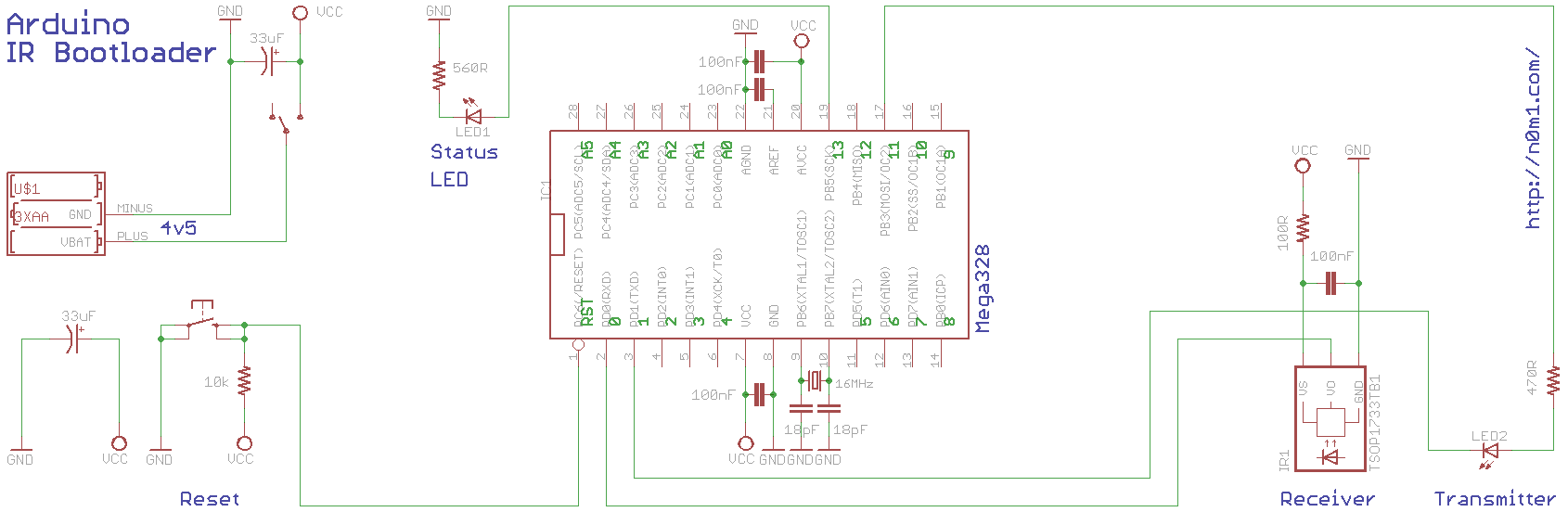
The status LED is on Arduino pin 13, there is an SPI/ICSP connector at the top right and the USB dongle in the middle. As we’ve been working on a modified bootloader, the ICSP connector has been seeing much use. The USB miniboard is an in house design, it’s based on the QFN package of the FT232R and as well as having all the I/O broken out, it sports a 3/5 volt slide switch on the bottom. The remainder of the parts are a smattering of capacitors, both bulk and bypass, as well as the reset and power switch. Below we have the circuit diagram, roughly laid out in the bread board fashion, click to view full size:
The Eagle footprint for the Mega328 is arranged as per the physical chip pins. The library file is available here: n0m1.com-mega328p.rar. And the schematic in eagle format is here: BBA sch
Supported linear rail can be quite expensive, at over $100 per rail per meter, not including shipping. An alternative support was theorized using 3/8″ threaded rod, drilled, tapped and screwed into the rail. Today it was assembled and tested, and has now been confirmed as a valid lower cost linear rail/bearing solution. This following method required no precision equipment other than a straight edge.
To facilitate handling as well as semi-accurate drilling and tapping, a 2×4 was notched approximately 90 degrees to carry the 25mm rail. Strapping was placed across the rail and screwed on either side to firmly fix it.
With rail securely nestled in groove, it was then marked every 12cm, center-drilled for alignment, drilled to 5/16″ and tapped to 3/8″. The drilling was performed with a vise in the drill press, tapping was done with the cordless drill and was finished up by hand with a blunt tap. No taps we’re harmed, maimed or mangled in the process, a localized anesthetic consisting mainly of 10w30 was used for the tapping process.
After blind tapping, the 3/8″ threaded rod was cut to 14cm lengths and the cut ends were sanded to remove burs. A pair of wrenches and a double nut was used to apply ample torque in securing the threaded rod into the linear shaft. With the threaded hole being tapered, some thread deformation occurred to make for a very solid fit.
With the rails assembled, the focus then shifted to the body of the Y-axis. A pair of thick walled 1.5″ steel square channel were drilled every 12cm to match the increments in the rails. A pair of 3/4″ MDF sheets were also prepared, that along with the channel, form a torsion box structure making up the Y-axis. As MDF is of sandwich construction, 1.5″ fender washers were used as force spreaders to prevent critical surface deformation (cracks around washers). With pressure the fender washers visibility deformed to apply a concave gradient.
A single rail was bolted to the torsion box frame and adjusts were made with the straight edge of a level until no light could be seen between the level and the rail. The Z-axis carriage was then added to align the second rail. As the carriage rode from one end to the other, the second rail was tightened down to make for a parallel linear system. No further adjusts were required, as seen in the following video the carriage rides smoothly end to end and without bind.
The last step is to seal the MDF from absorption of moisture for dimensional stability. Weather permitting, this will be done with some epoxy based garage floor paint. In perspective, this is one of three axis’ making up the CNC Gantry Router project.
In the previous post about the MMA8453_N0m1 library we talked about how to get the stream of raw XYZ data back from the accelerometer. In this post we will be getting into some of the more advanced features of the MMA8453.
The two advanced features that the MMA8453_N0m1 library breaks out for easier use are the interrupt motion detection, and the interrupt shake detection. Now motion and shake sound like the same things, but in fact they are slightly different. What motion detection does is allows you to detect any type of motion above a certain force threshold. While shake is more specific and allows for only detecting sharp fast motion, by using a highpass filter to remove gentler smoother rolling motions. The library includes 1 example for each feature. However the way the library is designed, the two features are used in a very similar manner so we will only cover one here.
So lets assume you have the library and circuit still setup from the previous post on the MMA8453_N0m1 lib. The example we will be explaining is the shake example, because its ever so slightly more complex than the motion. Though really its almost identical. After making the library object just as before, the first thing you will do is initialize the library in the arduino setup() function, with the following function call:
accel.shakeMode(32,true,true,true,false,2);
So the first parameter in this function, which is currently set at “32” the shake detection acceleration force threshold, which is a value between 0-127. This value is calculated through a simple formula as follows. The gravitational threshold you desire divided by 0.063. So for example in the above line we do this: 2g/ 0.063g = 31.746, and since the parameter is an int, lets round that value to 32.
The next 3 parameters are just enabling each axis for shake detection; listed X, Y, Z. So if your project only needs to detect a shaking motion over 1 axis you can disable the others.
The second last parameter is a boolean to enable one of the INT pins on the MMA8453. So, to put it simply, True = pin 2, False = pin1.
The last parameter is to set the Arduino interrupt pin number. In this example we are setting it to pin 2. However you could set this to any interrupt pin you have available. Included in the example folder is an example that uses pin change interrupt to use a non standard interrupt pin. After that you are pretty much done. There are just a few simple lines left to add:
You must call the update function at the top of the loop(). The shake function returns true or false if shake is detected, and the shakeAxisX(), shakeAxisY(), shakeAxisZ() functions will return true if a particular axis is shaken. That’s all there is to it! The motion functions are almost identical except it will only return whether or not there is motion, not which axis is in motion. Well I tried to make it more complex, then the previous post. That formula had you sweating, didn’t it?
A project we’ve been recently working on requires a custom Arduino boot loader. Working in an incremental fashion, the first step is getting the stock Arduino boot loader to compile with the latest WinAVR libraries and current Arduino 1.0 IDE. While this wasn’t terribly difficult, it did require a bit of searching, debugging, testing and then a bit more debugging before it worked as intended. Presented here for your convenience, are the fruits of this labor, outlined are the following steps:
Once you’ve downloaded and unzipped it, navigate to the bootloaders folder at the following path in Windows: arduino-1.0hardwarearduinobootloaders. On the Mac, the path is /Applications/Arduino.app/Contents/Resources/Java/hardware/arduino/bootloaders/. For purposes of testing, I’ve made a new folder here called: atmega168test. And populated the new test folder with the two files ATmegaBOOT_168.c and Makefile from the folder atmega.
For programming under Windows, I prefer to use Programmers Notepad 2, an open source editor with syntax highlighting for many common languages (it makes the words pretty colors). You can download it here: http://www.pnotepad.org/. Windows Notepad or any other text editor will also suffice.
Step 2: Modify the boot loader source The first (and only) compiler error we will tackle is due to the EEWE bit definition missing in versions 1.6.7 and newer of the file /avr/eeprom.h. The actual compiler error reads as:
ATmegaBOOT_168.c: In function ‘main’: ATmegaBOOT_168.c:596:11: error: ‘EEWE’ undeclared (first use in this function) ATmegaBOOT_168.c:596:11: note: each undeclared identifier is reported only once for each function it appears in make: *** [ATmegaBOOT_168.o] Error 1
This EEWE issue (152) has been around for a while and was originally reported in 2009. Within the source file ATmegaBOOT_168.c, around line 584, we will comment out the old and add in the new:
// ?kraz? -fixed EEWE bit definition missing in versions 1.6.7 and newer of the file /avr/eeprom.h
// According to this issue reported in 2009: http://code.google.com/p/arduino/issues/detail?id=152&q=eewe
#if defined(EEPE)
				while(bit_is_set(EECR,EEPE));			//Wait for previous EEPROM writes to complete
#else
				while(bit_is_set(EECR,EEWE));			//Wait for previous EEPROM writes to complete
#endif

/*
#if defined(__AVR_ATmega1280__) || defined(__AVR_ATmega1281__)
				while(bit_is_set(EECR,EEPE));			//Wait for previous EEPROM writes to complete
#else
				while(bit_is_set(EECR,EEWE));			//Wait for previous EEPROM writes to complete
#endif
*/
And don’t forget to save the file!
Step 3: Modify the makefile Now that we have the bootloader fixed, it does compile without error, but it ends up larger than the 2k space allocation for the bootloader section of the MCUs flash. The easiest solution here is to bump the compiler optimization level up to -0s. This is in the makefile on line 52, beware the makefile isn’t C language, it uses the # operator to comment out a line:
# ?kraz? - changed opt level to fit under 2k
OPTIMIZE   = -Os
# OPTIMIZE   = -O2
Step 4: Compile in command prompt The final step is to compile, under Windows we will be using the command prompt. The location of command prompt will depend on your version of Windows, in 7 it can be found by typing the first few letters of command in the search box of the start menu. Once it’s open, use the “CD” command navigate to the bootloader folder of your Arduino install as seen below in Windows, like this:
cd C:arduino-1.0hardwarearduinobootloadersatmega168test
And on the Mac, like this:
cd /Applications/Arduino.app/Contents/Resources/Java/hardware/arduino/bootloaders/atmega168test
We then compile with the command “make pro8”, which specifies the target board, in this case it’s an Mega168 clocked at a relaxing 8Mhz. Other board target definitions can be found listed in the makefile, such as diecimila, lilypad, ng, atmega328_pro8, mega, etc. If the hex already exists in the folder, you will get a message make: Nothing to be done for `pro8′. In this case just delete the hex and compile again with “make pro8”. If everything went alright, you should see the compiler report as in the first image at the top of this post. Good luck and happy compiling!
NoMi Design’s northern lab recently received some next generation gallium-nitride on silicon carbide LEDs. These new XBD series LEDs from Cree are promising double the lumen per dollar of existing technologies. From what we gather, the reduced cost is a result of a smaller die (2.45 mm²) and the silicon carbide base allowing higher manufacturing yields by way of better thermal expansion matching. The four above on the left are the XBD SiC LEDs, for comparison, the two on the right are a slightly larger (3.45 mm²) and more powerful Cree XBG.
As seen on left the new SiC LEDs sport an XBox logo, copyright lawsuit expected in 3, 2, 1 … This specific R3 binned XBG (right) is rated for 406 lumen at 1.5 Amps and the R2 binned SiC XBD (left) is rated for 252 lumen at 1 Amp. Some modification of a Cree 7090 star was required to heatsink these tiny LEDs. A bit of cutting, followed by application of Pb free solder paste and then into the toaster on high for about 5 minutes resulted in some baked goodness, crunchy on the outside but still chewy inside.
Next up is the characterization curves, where we can see the SiC LED has a higher forward voltage for equal current when compared to the XBG. With these new SiC LEDs offering up a much better lumen per dollar it won’t be long before they start showing up everywhere…